
Must Be 21 To Enter
By entering this site you are agreeing that you are at least 21 Years of Age or older.
I AM 21 OR OLDERDC Medical Card Requirements: A Complete 2026 Guide
.svg)

.png)
If you're trying to figure out DC medical card requirements right now, you're probably running into the same problem others encounter. One page talks about cards, another talks about registration, another mentions doctors, and then a friend tells you DC is easier than other states anyway.
That confusion is normal. Cannabis rules are fragmented across the country, and generic explainers often blur together systems that work very differently. In DC, the process is more approachable than many people expect, but there are still practical friction points that matter, especially around ID, residency, caregiver situations, and how to use your approval once you have it.
Demystifying DCs Medical Cannabis Program
You read one page that says DC is easy, another that talks about registration rules, and then someone tells you your out-of-state card might still matter. That is usually the moment people walk into the shop and ask us, "How does DC work?"
The short answer is that DC's medical cannabis program follows its own local rules, and the friction usually shows up in the details. Generic national guides tend to blur together certification, registration, residency, visitor access, and purchase rules. In DC, those pieces are related, but they are not identical. That difference matters if you want to avoid delays or show up expecting privileges your paperwork does not give you.
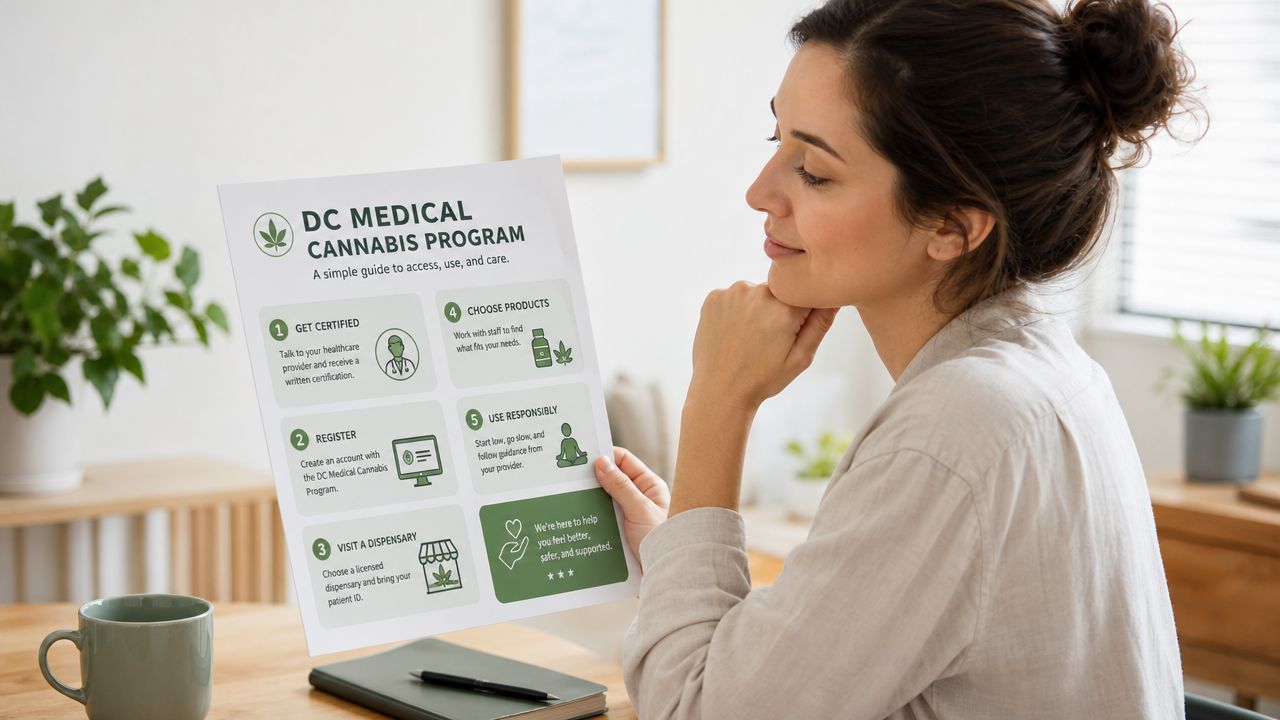
Why DC feels simpler than other states
DC often feels more approachable because the program is less boxed in than patients expect. At the same time, "simpler" does not mean "automatic." Small document issues, confusion about reciprocity, and assumptions about whether a digital approval is enough can still slow people down.
Patients who have already looked at how weed was legalized in DC usually understand this faster. Adult-use rules, medical access, and dispensary purchasing are connected in DC, but they are not the same system.
From the dispensary side, we see the same pattern all the time. New patients are rarely confused about cannabis itself. They are confused about process. They want to know which rules apply to DC residents, which apply to visitors, and which documents work when it is time to register or buy.
Practical rule: If the process feels inconsistent, the problem is usually the system, not you. DC has its own setup, and advice copied from another state can send you in the wrong direction.
What patients usually want to know first
The first questions are usually practical:
- Can I get approved without years of medical records
- Which ID or residency documents are accepted
- Do I need the physical card before I can purchase
- Can a caregiver step in if the patient needs help
- Will an out-of-state patient or cardholder be treated differently in DC
Those are the pressure points that decide whether the process feels easy or frustrating. This guide answers those DC-specific sticking points directly, especially the ones broad medical card articles tend to gloss over.
Confirming Your Eligibility for a DC Medical Card
The first thing to know is that eligibility questions usually sound simpler than they are. People often ask, "Do I qualify?" What they really mean is, "Can I complete the process without getting rejected over paperwork, age, identity, or a family situation?"
In regulated cannabis programs, the hard part often isn't the diagnosis list. It's the edge cases. Several official programs show that the practical challenge is often who can apply, what proof is accepted, and how minor or caregiver situations are handled. California is a useful example because it allows minors under special circumstances and requires added parent, guardian, or legal-authority involvement, along with alternate identity documents and caregiver application rules, as noted in the California MMICP FAQs.
Start with the simplest question
For most adults, eligibility starts with basic identity and residency readiness. Before you worry about product menus or dispensary visits, make sure your documents match your current situation.
A clean application usually means:
- Your ID is current. An expired ID can create avoidable delays.
- Your residency proof is readable. If a document is blurry, cropped, or shows an old address, that's where people lose time.
- Your name is consistent. If the name on one document doesn't match the name on another, expect extra scrutiny.
If you're unsure whether you need a medical card at all, this breakdown on whether you need a medical card in DC helps clarify the practical use case.
Caregivers and family applications need extra attention
Caregiver situations are where generic articles usually fail people. A parent helping an adult child, an adult child helping an older parent, or a guardian handling documents for a minor patient all run into one issue fast. The application isn't just about the patient. It's about who has legal authority to act.
A practical example helps. Say a parent is trying to help a younger patient who can't manage the paperwork independently. The parent should expect to gather identity documents for both people, proof of the patient's status, and whatever documentation shows the parent or guardian has authority to act on the patient's behalf. If any of those pieces are incomplete, the process becomes harder than it needs to be.
If you're applying for someone else, don't start with the online form. Start with a folder of documents that proves identity, authority, and residency.
What doesn't work well
Some applicants make the process harder by treating cannabis registration like a casual retail sign-up. That approach usually backfires.
Common mistakes include:
- Uploading partial documents. A cut-off license photo is one of the easiest ways to create a delay.
- Assuming a caregiver can just explain the relationship. In regulated systems, that relationship usually needs documentation.
- Waiting until the last minute. If you're trying to buy the same day, every mismatch feels bigger.
For most adults, eligibility is manageable. For caregivers, minors, and patients with unusual documentation, the key is preparation, not speed.
A Step-by-Step Guide to the Application Process
Start the application only after your documents are ready. In DC, the form itself is usually the easy part. The delays tend to come from blurry uploads, address mismatches, or choosing a path before you know which documents that path calls for.
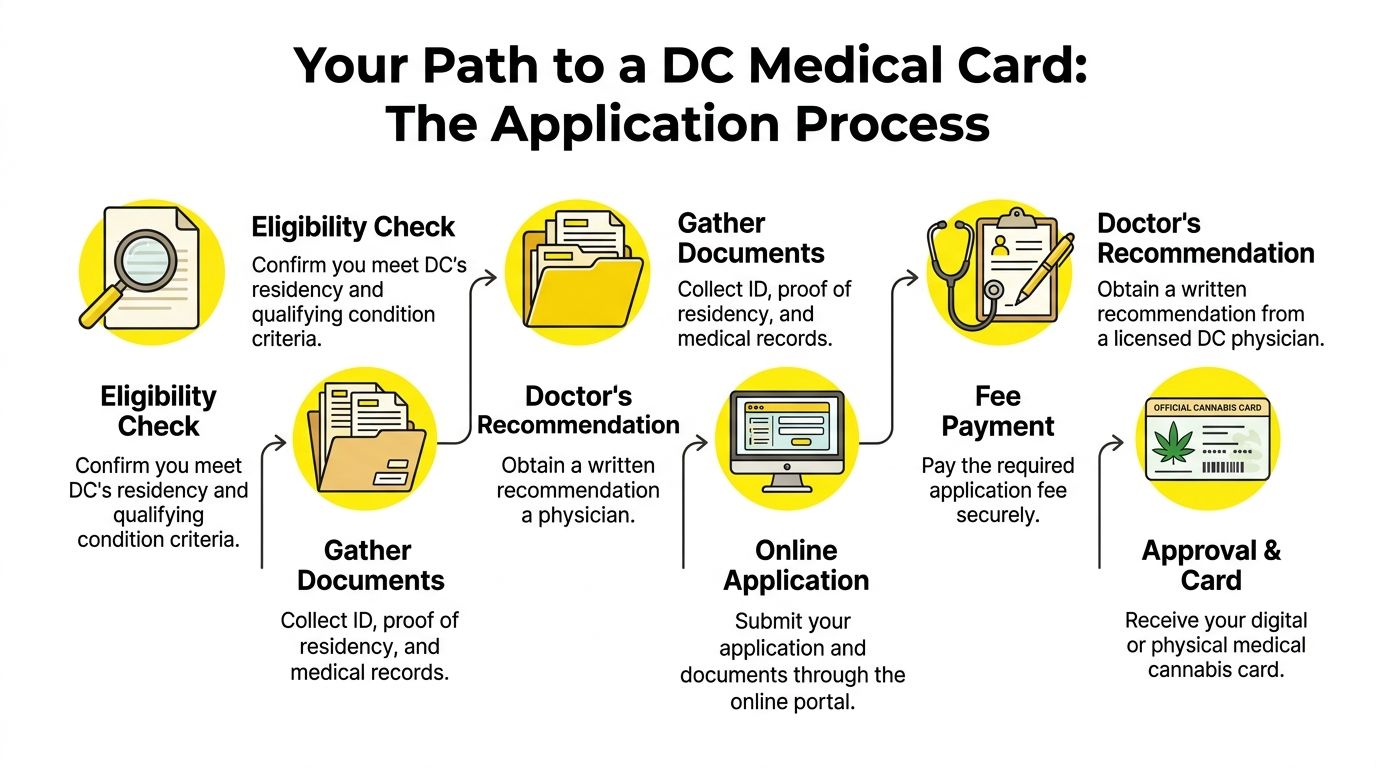
The practical sequence that works
A common situation we see is a patient filling out half the form on a phone, then stopping to hunt for an ID photo or proof of address. That is where small mistakes start. A better approach is to set aside a short block of time, save everything in one folder, and finish the application in one sitting.
Use this order:
Pick your application route first
In DC, some patients self-certify and others prefer a clinician-supported route. Choose that first so you know exactly what you need before you upload anything.Collect every document before opening the form
Have your identification, residency proof, and any other supporting records ready to go. If you are using a clinician route and want local support, this guide to an Anacostia clinic in Washington DC is a practical place to start.Review your files like a reviewer would
Check for glare, shadows, cropped edges, and outdated information. If your document photo is hard to read on your screen, it will be hard to verify on theirs too.Complete the form carefully and match every detail
Use your legal name and current address exactly as they appear on your documents. Even a small inconsistency can slow things down.
A real-world example of the easy path
Say Alex is applying after work and wants to avoid back-and-forth. Alex checks that the ID is current, makes sure the address matches across documents, saves clear images to a phone folder, and submits the form from home on a stable connection.
That usually goes well.
What tends to cause trouble is more predictable than people expect:
- An old address on one document
- A photo that is too dark or blurry
- A rushed application finished while commuting or multitasking
DC also has a few friction points that generic guides skip over. Reciprocity questions, document format issues, and proof-of-address details can confuse both local patients and visitors who assume the process works the same way everywhere else. We walk people through those questions all the time at Mr. Nice Guys DC, and the fix is usually simple once you know what to check before submitting.
For a visual guide, the following video walks through the process:
Small details that save time
The cleanest applications are the boring ones. Every field matches. Every upload is readable. Nothing looks rushed.
What usually works: complete the form at home, with your documents already saved in one folder on your phone or laptop.
Use this quick check before you hit submit:
| Item | What to check |
|---|---|
| ID | Current, readable, uncropped |
| Residency proof | Recent, matching address |
| Application entries | Name and address match documents |
| Uploads | No glare, blur, or cut-off edges |
That kind of prep keeps the process short and keeps you from having to correct preventable mistakes later.
Understanding Fees, Timelines, and Renewals
A lot of first-time patients hit the same wall here. They get through the application, then pause at the last minute because they are not sure what they will owe, how long approval will take, or what happens when the card expires.
That confusion gets worse when people read advice meant for another state. Florida, California, and DC do not follow the same playbook. We see that mix-up often at Mr. Nice Guys DC, especially from visitors and new local patients who assume every medical program uses the same fees and renewal rules.
What to budget for
The practical way to approach cost is simple. Check the current DC rules right before you apply, and separate required program costs from any optional medical visit or document-related expense.
That matters because patients often bundle everything together and end up with the wrong expectation. One person may only need to complete the registration steps. Another may also need a clinician appointment or updated documents before submitting. Those are different costs, even if both people end up with valid DC access.
A safer budgeting checklist looks like this:
- Confirm the current DC application path before paying anything
- Separate registration costs from any clinician consultation
- Save payment receipts and submission confirmations
- Set a reminder for renewal well before expiration
Old screenshots cause problems. So do Reddit threads and advice from a friend who applied under different rules.
How long approval usually takes
Timing is partly about the program, but a big part of it comes down to whether your application is clean on the first try.
A patient who uploads clear documents and completes the form carefully usually has a simpler path than someone who has to fix missing information later. In practice, the delay often comes from corrections, not from the basic act of applying. That is one of those friction points generic guides miss. DC can be straightforward, but only if the details line up.
If you need your card by a certain date, do not wait until the week you plan to shop. Give yourself room for a follow-up request, a document update, or a simple typo fix.
Renewals are easier when you treat them early
Renewal tends to be much less stressful than the first application if your records are still current. If you moved, changed your name, or replaced your ID since the last cycle, update those pieces before your renewal window gets close.
The best habit is boring and effective. Put a reminder on your phone well ahead of expiration.
Renew early enough that you are not fixing an ID or address issue on the same day you hoped to shop.
That is the trade-off. Waiting can save you five minutes today, but it can cost you access later if one document no longer matches. We tell patients this all the time because the problem is so avoidable. A little lead time usually keeps renewals smooth and keeps your dispensary visits on schedule.
Your Printable DC Medical Card Checklist
A checklist works better than a long explanation when you're ready to apply. Save this section, screenshot it, or print it. The goal is to make sure nothing important gets missed when you're uploading documents or preparing for your first dispensary visit.
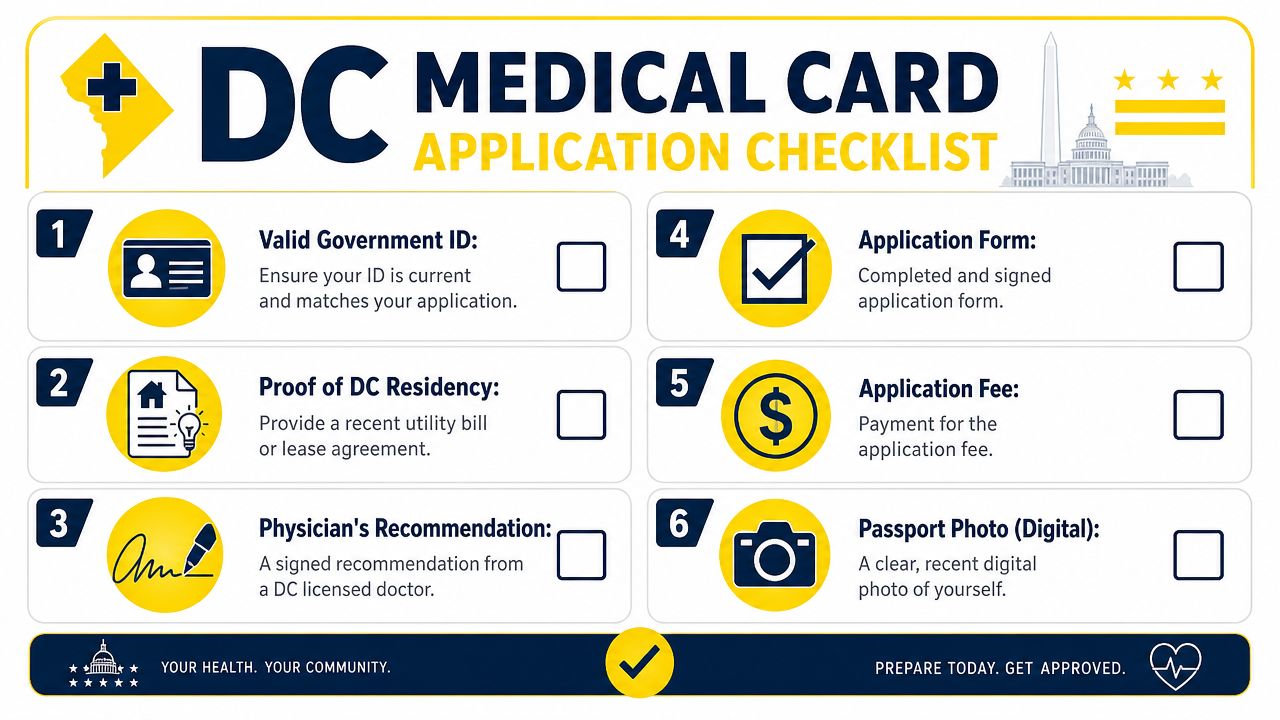
Quick pre-application check
Before you begin, ask yourself three yes-or-no questions:
- Do I have current identification
- Do I have proof of residency if it's needed for my application path
- Do my documents all show consistent personal information
If any answer is no, fix that first.
For a helpful walkthrough of what the first dispensary side of the process feels like, this first-timer's guide to your first dispensary visit is worth saving for later.
DC Medical Card Application Checklist
| Step | Details | Done |
|---|---|---|
| Eligibility check | Confirm you're applying under the correct patient or caregiver path | ☐ |
| Government ID | Make sure it's current, readable, and not cropped in the upload | ☐ |
| Residency proof | Use a clear document that supports your current address if required | ☐ |
| Supporting paperwork | Gather any certification or caregiver-related documents before starting | ☐ |
| Online application | Complete the form carefully and match document details exactly | ☐ |
| Confirmation records | Save screenshots or emails showing your submission status | ☐ |
Practical screenshot version
If you want the shortest possible version, use this:
Bring your ID, make sure your address documents match, upload clear images, save every confirmation, and don't wait until the day you want to purchase.
That simple routine prevents most avoidable issues.
Using Your Card Visitor Rules and Common Pitfalls
The biggest surprise for many patients is that getting approved isn't the finish line. Using your registration correctly matters just as much, especially if you're traveling, helping a family member, or trying to buy with a digital record instead of a physical card.
Visitor questions come up all the time because people assume cannabis access is portable in the same way a driver's license is portable. It isn't. Medical card requirements remain highly state-specific, and portability is often where patients get confused.
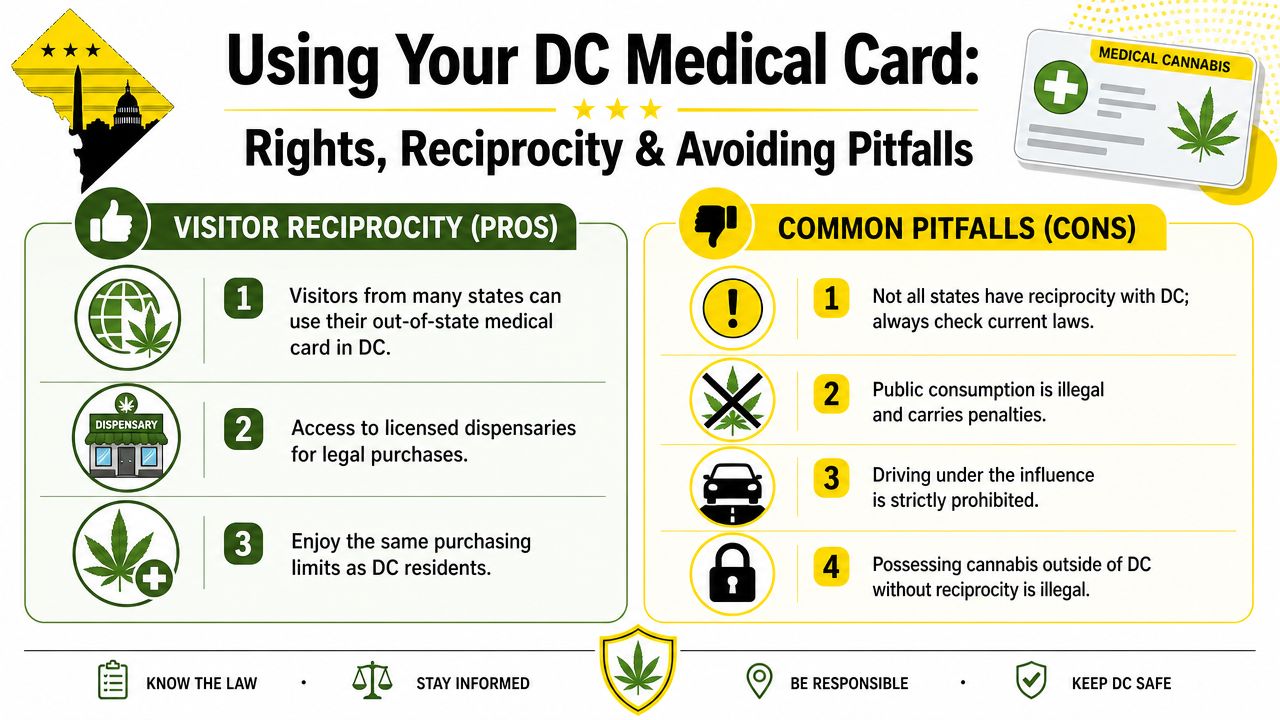
Why reciprocity confuses so many people
One state may emphasize a registry entry. Another may require an active card. Another may rely on physician prescription language instead of a traditional card model.
The verified data points to that fragmentation directly. Texas uses a physician prescription model for low-THC cannabis and limits use to swallowing, not smoking. Georgia requires an active Low-THC Oil Patient Registry Card plus possession of the card and compliant product labeling. California uses a county-run MMIC model. Arkansas requires residency and physician certification and excludes members of the National Guard and U.S. military. Those examples, described in the verified data tied to the Texas medical marijuana information page, show why a generic national checklist doesn't help much.
A practical example: a visitor may arrive in DC with valid documentation from home and assume that's enough everywhere else too. Then they cross a border again and discover the next jurisdiction treats their status differently.
Common mistakes cardholders make
Maryland offers a useful comparison because its process includes a more explicit verification checkpoint. After patient registration and provider certification, dispensaries must verify the patient in the Maryland Cannabis Administration's Onestop database before any sale, patients are limited to a maximum thirty-day supply at one time, and the state distinguishes between a free printable paper ID card and an optional mailed ID card costing $25, according to the Maryland process to obtain medical cannabis access.
That comparison highlights a few mistakes people also make in and around DC:
- Assuming a physical card is always required. In some systems, database verification and government ID matter more than plastic in your wallet.
- Treating reciprocity like automatic nationwide acceptance. It isn't.
- Ignoring local use rules once the purchase is complete. Buying legally doesn't erase every other cannabis restriction around possession and use.
- Crossing jurisdiction lines casually. That's where patients create avoidable legal risk.
Carry the documentation the program expects, not the version of the rule you heard secondhand.
A better way to use your approval
Use your registration like any other regulated credential. Keep your ID current. Keep your digital records accessible. Double-check visitor rules before you travel. If you're helping another patient, keep caregiver documents organized in the same place every time.
That habit is simple, but it prevents the most common check-in problems.
Making Your First Purchase at Mr Nice Guys DC
A lot of first-time patients expect the purchase itself to be the stressful part. In practice, once your DC registration is squared away, check-in is usually quick. The hiccups tend to come from small things people overlook, like a missing ID, an approval email they cannot pull up, or assumptions they picked up from another state's program.
Other medical markets show the same pattern. Minnesota, for example, requires a few separate steps before a first purchase, and the state notes that certification emails can end up in spam or junk folders, which can delay access even after a provider approves the patient, according to Minnesota's patient enrollment basics.
That is a useful reminder for DC patients. Before you leave home, pull up your approval on your phone, bring your government ID, and make sure you can access the email account you used during registration. If you want a practical refresher on products and dispensary basics, our medical cannabis 101 guide for your first visit to Mr. Nice Guys DC can help you walk in with fewer questions.
Once you get to the dispensary, be direct about what you want help with. Tell us whether you are looking for faster relief, longer-lasting effects, easier dosing, or a format that feels more familiar. If you are new to cannabis, say that early. It helps us steer you away from products that may feel too strong or too inconvenient for a first purchase.
At Mr. Nice Guys DC, we help patients compare flower, edibles, cartridges and pens, pre-rolls, concentrates, topicals, and tinctures without rushing the conversation. Some patients want the fastest onset possible. Others care more about discretion, predictable dosing, or avoiding inhalation. Those trade-offs matter, and a good first visit should make them easier to sort through. You can review the menu and choose pickup, curbside, or delivery at Mr. Nice Guys DC before placing your first order.
Mr Nice Guys DC
At Mr. Nice Guys DC, we’re more than just a cannabis delivery service — we’re passionate advocates for quality, convenience, and community. With years of experience in the cannabis industry, our team is dedicated to educating and empowering customers across Washington, D.C. Whether you're a seasoned user or just starting your cannabis journey, our blog delivers trusted tips, product insights, and the latest updates from the world of weed. Stay informed, stay elevated.
